How AI Agents Think and Act: ReAct in 2 minutes


Imagine asking someone to solve a mystery problem. They just don’t guess the answer at the start or arrive at the answer instantly. They think about what they need, then take an action, look at what they get after the action and then repeat the process until they solve it.
That is what ReAct Prompting is, in a nutshell. It is reasoning plus acting.
What is ReAct
Standard GenAI models “guess” (although it is not actual guess) the next word based on the information it already has (ie, through the training process). ReAct turns the model into a problem solver on top of the next word prediction. The model will be given access to various tools (like web search, calculators, databases, etc.) and make the model run in a loop
The ReAct Loop
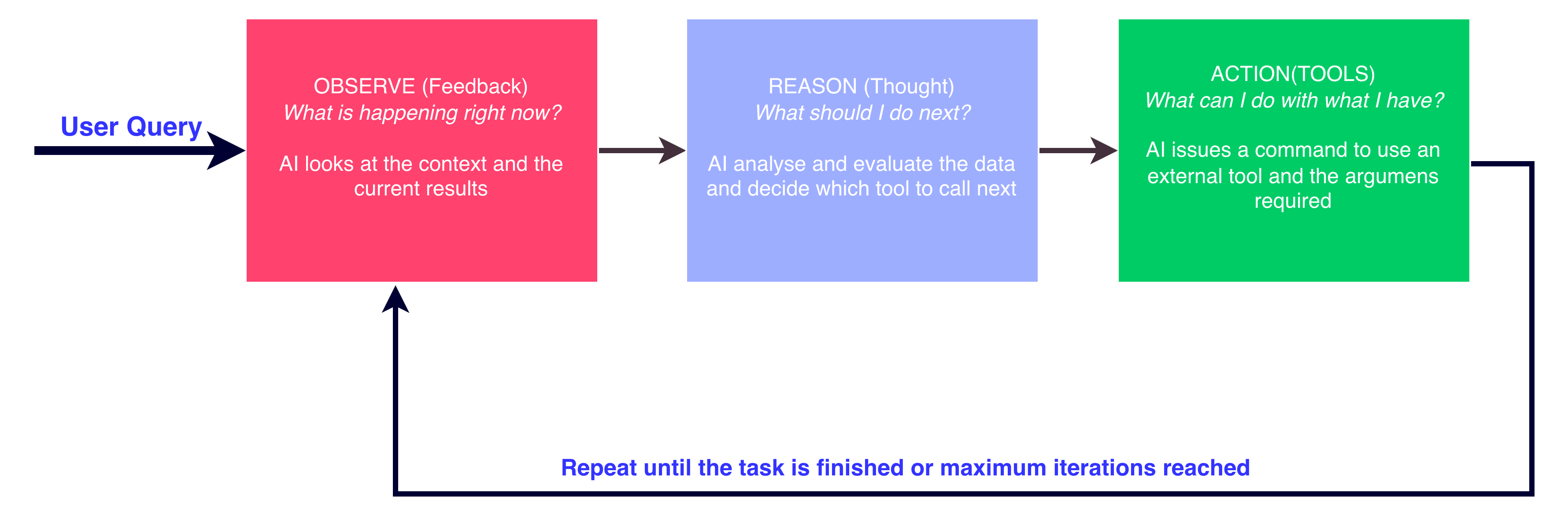
Thought - The model plans what to do next based on what it knows so far and the context from the user query
Action - The model chose and execute an action or call a specific tool (Example: Calculator (235*546))
Observation - The model receives the output from the Tool and updates its context
Why do we need ReAct
ReAct is particularly useful when the user query requires some external information or requires date specific references.
The GenAI models are trained to predict the most probable next token based on the previous context. The next token will be the most statistically probable token, but not necessarily the correct token. When asked complex or real-time questions, these models often tend to hallucinate. This is where a Thought + Action loop can be helpful
These models doesn’t have access to your private data or any data that has been updated after a specific date. ReAct will let the model to use tools like Web search or your internal Databases
ReAct in action - Example
User Query “What is the temperature difference between Tokyo and London right now?”
Thought 1: I need to find the current temperature in Tokyo first.
Action 1: WeatherAPI[” Tokyo”]
Observation 1: 28°C, Clear
Thought 2: Now I need the current temperature in London.
Action 2: WeatherAPI[” London”]
Observation 2: 18°C, Light Rain
Thought 3: I have both values. I need to calculate 28°C - 18°C = 10°C.
Action 3: Calculator [28 - 18]
Observation 3: 10
Thought 4: I have all the required information.
Final Answer: Tokyo is currently 10°C warmer than London.
Technical Deep dive (Optional)
If you are interested to understand how ReAct works under the hood.
System Prompt Construction
The ReAct relies on a strict system prompt that will instruct the model to format its output so the backend parser can catch the tool calls. An example system prompt is given below
Answer the following questions as best you can. You have access to the following tools:
- Weather API [city]: Returns current weather string.
- Calculator[expression]: Evaluates a mathematical string.
Use the following format:
Question: the input question you must answer
Thought: comment on what you should do
Action: the action to take, should be one of [Weather API, Calculator]
Observation: the result of the action
... (this Thought/Action/Observation can repeat N times)
Thought: I now know the final answer
Final Answer: the final answer to the original input question
Step 1: The system prompt will be concatenated with the user’s query and passed to the model to generate next tokens
#user query to LLM
Answer the following questions as best you can... [System Prompt]
Question: What is the temperature difference between Tokyo and London right now?
Step 2: The LLM begins generating the tokens autoregressively. Following the system prompt instructions, it structures its reasoning and outputs the first action.
##LLM output to Orchestrator
Thought: I need to find the current temperature in Tokyo first.
Action: Weather API[Tokyo]
Step 3: The orchestrator (Example, A Python script) detects the Action pattern from Step 2 output. The orchestrator halts the LLM generation, and calls the tool (or Function) using the input argument
#Orchestrator execution
Tool Name --> “Weather API”
Argument --> “Tokyo”
Step 4: The orchestrator appends the results from the tool call to the conversation history and passes it back to the LLM for next Thought
#Orchestrator output to LLM
[System Prompt + Question]
Thought: I need to find the current temperature in Tokyo first.
Action: Weather API[Tokyo]
Observation: 28°C, Clear
Step 5: Seeing the conversation, the model continues its generation
#LLM output to orchestrator
Thought: Now I need to find the current temperature in London.
Action: Weather API[London]
Step 6: Next Action will be detected by the orchestrator and calls the Tool (or function).
#Orchestrator execution
Tool Name --> “Weather API”
Argument --> “London”
Step 7: Orchestrator append the output to conversation history and calls the LLM again.
#Orchestrator output to LLM
[System Prompt + Question]
Thought: I need to find the current temperature in Tokyo first.
Action: Weather API[Tokyo]
Observation: 28°C, Clear
Action: Weather API[London]
Observation: 18°C, Light Rain
Step 8: The model receives the updated history and realizes it needs to perform arithmetic.
#LLM output to orchestrator
Thought: I have both temperatures (28°C and 18°C). I need to calculate 28 - 18 to find the difference.
Action: Calculator [28 - 18]
Step 9: Next Action will be detected by the orchestrator and calls the Tool (or function).
#Orchestrator execution
Tool Name --> “Calculator”
Argument --> 28,18
Step 10: Orchestrator append the output to conversation history and calls the LLM again.
#Orchestrator output to LLM
[System Prompt + Question]
Thought: I need to find the current temperature in Tokyo first.
Action: Weather API[Tokyo]
Observation: 28°C, Clear
Action: Weather API[London]
Observation: 18°C, Light Rain
Action: Calculator [28,18]
Observation: 10
Step 11: Final Output and Termination
#LLM output
Thought: I now know the final answer.
Final Answer: The temperature difference between Tokyo and London is 10°C (Tokyo is 28°C and London is 18°C).
Conclusion
To wrap up, standard GenAI models are great at predicting words, but they struggle with facts, math, and real-time data. ReAct Prompting solves this by slowing the model down and forcing it to "show its work." Through the continuous loop of Thought, Action, and Observation, the model stops guessing and starts verifying. This simple but powerful orchestrator loop is what turns a basic language model into a highly capable, tool-wielding assistant.
Thanks for reading this article. In case of any queries or discussions, please reachout to me via LinkedIn.